

Last Updated on March 31, 2026 by Yash Saini
Apple and Google have solved the biggest problem that iPhone users face when switching to Android with the new iOS 26.3 update. Users often face challenges transferring their data from iPhone to Android, but that can now be done with a few clicks in just a few minutes.
iOS 26.3 Makes Transferring Data from iPhone to Android Easy
On Wednesday, February 11, Apple released its latest iOS 26.3 update, which is more than just a bug fix. It includes a special feature that makes switching from an iPhone to an Android phone easier, as it can move data like photos, messages, apps, and more.
Although the update carries many more features, this one stands out. Previously, users had to download a third-party app or use cumbersome cloud transfers to switch to Android, but with the update, this can happen by setting the two phones side by side.
How to Transfer Photos and Messages From iPhone to Android?
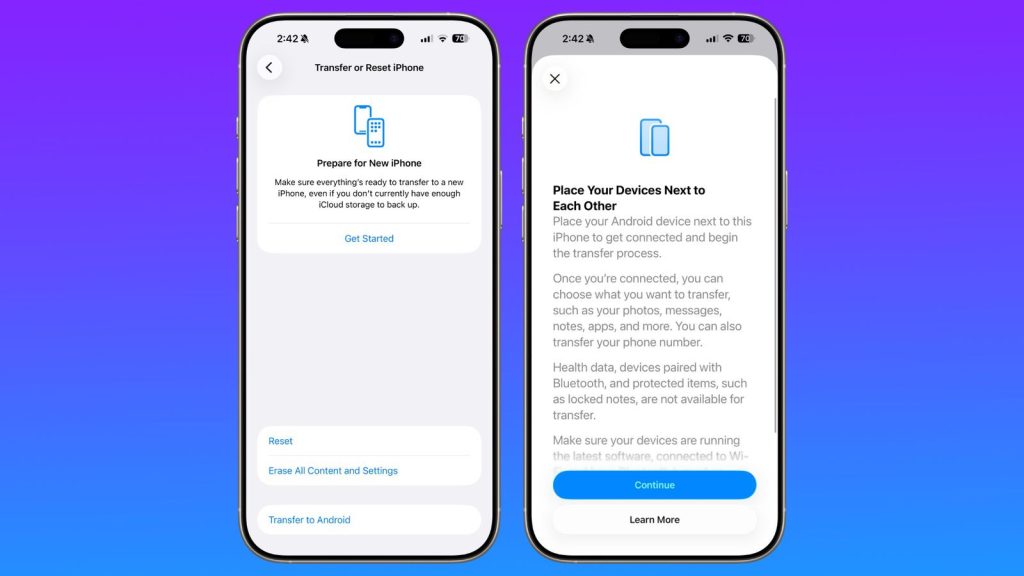
Once the user has downloaded and installed iOS 26.3, they can find the transfer tool in Settings > General > Transfer or Reset iPhone. After initiating it, the user can simply place their iPhone next to the compatible Android device, while ensuring that they have connected to the same Wi-Fi and have Bluetooth enabled.
Next, a QR code will be displayed that the user can scan and initiate the transfer.
Also Read: Samsung Galaxy S26 Ultra Launch Date, Specs & What to Expect in 2026
What Can or Cannot be Moved with iPhone iOS 26.3?
Here’s the list of data that users can move: –
- Photos and videos, with full resolution, including albums
- SMS and iMessage threads (converted to RCS/standard formats)
- Contacts and Calendars
- Notes and stored passwords in the Keychain
- Free Apps (The tool will identify the current apps and find their equivalents on the Google Play Store)
- Phone number
Although the user can transfer much, there’s still data locked to Apple for security and privacy reasons, which they cannot transfer. Here’s the list of things that won’t transfer: –
- Health Data (it will remain encrypted on the iPhone)
- Locked/protected notes, but the user can manually unlock and export them
- Bluetooth pairings will be lost, so they will need to re-pair their AirPods or other accessories
- Paid Apps/In-App purchases
Other Notable iOS 26.3 Features
Along with data transfer, iOS 26.3 has many more interesting features. However, some of these are region-specific, and some require comparatively newer models.
Hide Your Location
With this new update, users can hide their exact location in a new privacy setting. However, this feature is limited to Apple’s own 5G modems, including the iPhone 16e and iPhone Air, and will expand to the iPhone 17e and iPhone 18 Pro due for launch this year.
It is also limited to a few mobile carriers, which include Telekom in Germany, EE and BT in the United Kingdom, Boost Mobile in the U.S., and AIS and True in Thailand. The one with a compatible phone and carrier can access it in the Settings app > Cellular > Cellular Data Options.
The new feature is like an extra privacy layer, which makes it harder for cell service providers to know people’s exact location. Instead of the accurate address, the feature will show the approximate neighborhood.
Note that it will not interfere with the apps, with which users intentionally want to share their exact location, such as the Find My app.
Exclusive Apple Features for Europeans
Users from Europe with a European Apple account will get additional features with the iOS 26.3 update. The first interesting feature is the ability to reply to messages with a third-party smartwatch.
Also Read: Apple iPhone 17 Pro Max vs Samsung Galaxy S25 Ultra: Full Comparison, Specs, Price, and Verdict
Using the new Notification Forwarding feature, users can react to notifications using any smartwatch that’s not an Apple Watch.
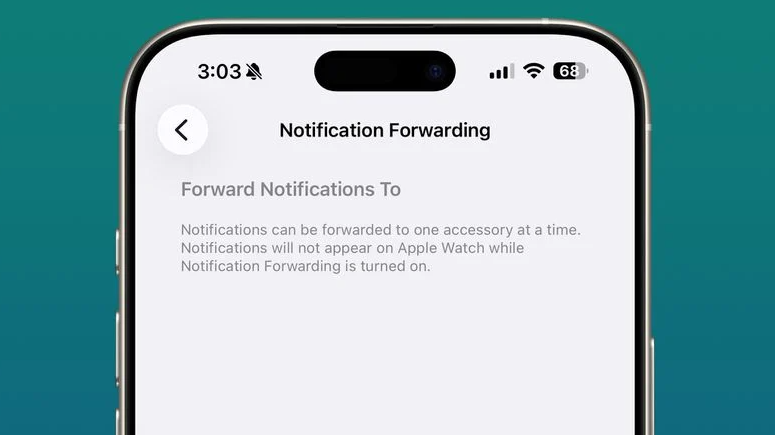
Secondly, they are offering AirPods-like smooth pairing for third-party headphones. Note that an additional app might be required for further features.
The next exclusive feature gives developers the ability to use NFC capabilities in their apps. From now on, instead of relying on the Apple Wallet, a bank could let Apple users use a digital card to make payments using NFC from inside their app.
Lastly, the smartphone seller is focusing on creating better communication between the iPhone and other devices. To do so, they are allowing data transfer like AirDrop, AirPlay, or Continuity Camera to other devices.
Weather Wallpapers
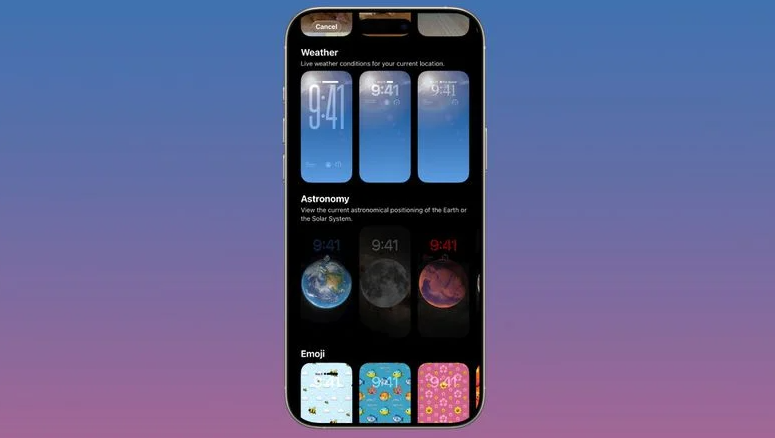
New dynamic Lock Screen wallpapers are now part of iPhone aesthetics. They will reflect real-time weather conditions with updated animations and also give the phone a more aesthetic look.
Overall, several new features have been introduced with the Apple iPhone iOS 26.3, and even better features are expected to feature with the iOS 26.4 update. Reports suggest that the 26.4 update will include a super-powered Siri enhanced by Google’s Gemini AI, new emojis, and more.
