

The much-awaited Android 17 Beta 1 is now officially live, creating buzz among Android and developer enthusiasts. This move is exciting, as Google has ditched the traditional “Developer Preview” phase this year and proceeded with the Beta 1 rollout after just an initial “Android Canary” channel for the earliest internal testing.
Google Rolled out Android 17 Beta 1 for Pixel
Google has finally rolled out Android 17 Beta 1 on February 13, 2026. Android 17 is the next major version of Google’s mobile Operating System (OS), which is debuting as a Beta version after the continuous Android Canary channel.
This is a significant milestone, which brings major changes, including a new search bar, a larger screen experience, and better performance. It also features subtle UI changes within the Pixel Launcher.
Also Read: iPhone 18 Pro Series Shocking Leaks: Bigger Battery, Smarter Chip, Stunning Camera Upgrades Incoming
What’s Cinnamon Bun?
Interestingly, Cinnamon Bun is the internal dessert codename for Android 17. It has been part of the Android and Google history, as these names have been over every software version with a sweet treat name in alphabetical order.
For this year, the letter was C (second trip), which led to the code name Cinnamon Bun. Some other examples are Android 4.4 KitKat and Android 5.0 Lollipop.
| Android Version | Year | Dessert Codename |
| Android 14 | 2023 | Upside Down Cake |
| Android 15 | 2024 | Vanilla Ice Cream |
| Android 16 | 2025 | Baklava* |
| Android 17 | 2026 | Cinnamon Bun |
Note that they have shifted to plain numbers these days for marketing, but the tradition is widely known and used among engineers.
Who Can Access Android 17 Beta 1?
The recent Pixel devices will be able to access Android 17 Beta 1. Here’s the list of Pixel phones, tablets, and folds that will get to join the new features: –
- Pixel 10 Series (10, 10 Pro, 10 Pro XL, 10 Pro Fold)
- Pixel 9 Series (9, 9 Pro, 9 Pro XL, 9 Pro Fold, 9a)
- Pixel 8 Series (8, 8 Pro, 8a)
- Pixel 7 Series (7, 7 Pro, 7a)
- Pixel 6 Series (6, 6 Pro, 6a)
- Pixel Tablets & Folds (Pixel Tablet, Pixel Fold)
How to Join the Beta?
The interested users with the eligible phones can follow these steps to join the beta: –
- Enroll your device in the Android Beta Program
- Once enrolled, go to settings
- Navigate through System and then to Software updates
- Update your phone
- Android 17 Beta 1 will be downloaded and ready to work
Also Read: Top 5 Best Smartphones Under ₹25,000 in India (2026 Edition)
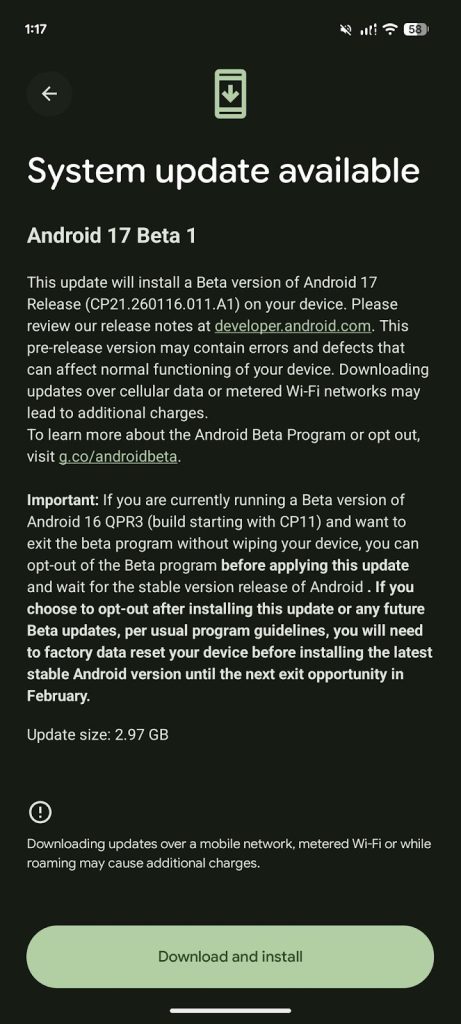
Some experts also claim that the users who are already enrolled in 16 QPR3 Beta 2.1 will have to leave the program before installing the 17 Beta.
What Changes With Google’s Android 17 Beta 1?
Google is focusing on bringing a seamless experience for Android users with this beta version. Experts note that it has greatly focused on adaptability and under-the-hood performance.
Slimmer Home Screen
One of the most noticeable features of Android 17 is its slimmer and more minimalist design, which was also seen in the older versions. It will stand out from Android 16, which has the search bar in thick, colored borders.
Shortcut Update
With the new update, users can now customize their shortcut tool. By default, it is in the AI Mode shortcut, but can easily be swapped to other tools like Gemini Live, Translate, Weather, and much more.
Previously, the shortcut was outside the search bar, but now it sits inside it.
Removable At a Glance Widget
Now, the At a Glance Widget is removable from the home screen. Although Google tested it with the Android 16 QPR3 betas on selected users, it is now widely available in Android 17 beta 1.
To remove, long-press the widget and remove it from the Pixel Launcher settings.
Other UI Changes
Reportedly, there are a few more minor UI tweaks, including the volume panel featuring a setting icon at the bottom. This gives better and clearer access to volume controls. Developers have also refreshed the brightness icon in Quick settings.
Large Screen and Foldable Optimizations
The tablets and foldables are experiencing the most major update in Android history. They now feature a Desktop mode enhancement, giving a more PC-like experience.
Also, the apps targeting Android 17 cannot resist the resizing or changing orientation on screens wider than 600 dp. The apps will have to fill the Pixel Fold or Pixel Tablet instead of the “letterboxing” (black bars).
Also Read: Apple iOS 26.3 Update Released: How to Transfer Photos and Messages From iPhone to Android?
Camera and Media
Android 17 features a major update to swap modes or lenses without restarting the entire session. It is significant since users previously often saw a tiny glitch or a viewfinder skip.
It also features a Loudness Management API, which will maintain consistent volume across all applications and hardware. As a result, there are no more volume shocks while changing apps.
Performance and Efficiency
In terms of performance and efficiency, there’s a major update to the Android Runtime (ART). The system will run smaller and more frequent memory cleanups than the heavy and full system sweeps.
FoneArena reports that users are witnessing up to 10% less CPU load, bringing better battery life. There’s also a notification memory limit, which prevents the background apps from shutting down the system.
With Android 17 Beta, Google has tightened the memory limits for custom notification views.
Note that these changes could change or disappear in future beta builds.